
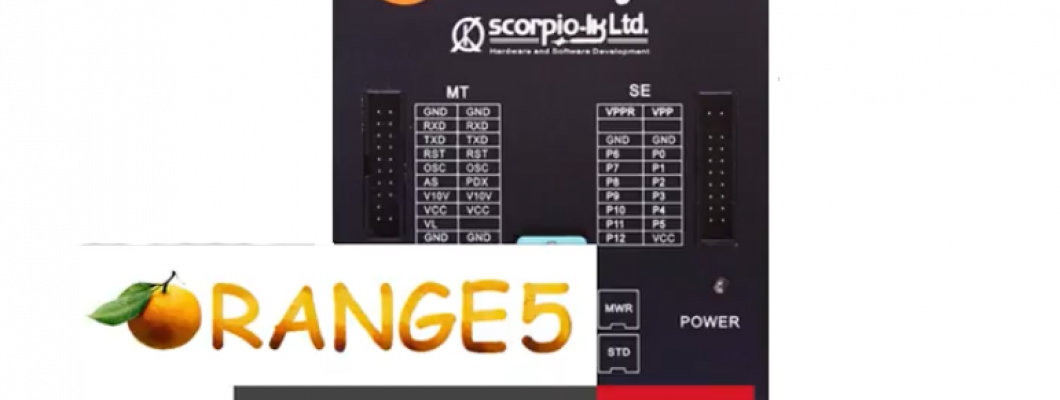
What is Orange 5?
Orange 5 is a professional programming device for memory and microcontrollers.
Unique feature of the current series programmers is built-in macrolanguage for writing down protocols, which gives fast and easy capability to add new types of microschemes, precisely meeting manufacturers' requirements to read/write algorithms
The Orange 5 kit contains:
- Orange5 programmer
- All of the most important multifuncional adapters, that covers almost all car brands and processors
- USB cable type A to B
- Software for instalation on computer
- Orange5 case
How to connect Orange5 programer with computer:
- Plug the USB cable jack B in the Orange5 programer
- Plug the USB cable jack A in the computer
- Install the software
Question :How to use the adapters?
Answer: Just plug the adapters into the Orange5 slot and you can start using it. You can also use the lead adapters for the processors that cannot be removed from the shell.
How to install the software for Orange5?
Follow the steps:
- Disable your antivirus software
- Click here to download the software for Orange5 from Scorpio-LK's web site.
Note*:To explain what XXXX-XXXX.rar is - the XXXX-XXXX represent the combination of the last nine symbols of your personal Orange5 serial number. In order to get your your personal files replace in the link above the respective characters from your Orange-5 serial number.
- Extract the files from the archive
- Open Device Manager(right click on My PC and choose Manage.From Computer Managment choose Device Manager).
- Connect Orange5 with the computer using the USB cable.
- In your Device Manager tab will appear Other devices, click it to expand and you should see the "Orange5".
- Right click Orange5 and choose Update Driver Software.
- Click browse my computer for driver software.
- Click let me pick from a list of devices on my computer and click Next.
- Click Have Disk.
- Click Browse and locate the files that you extracted and open Driver folder.
- Select the type of your operationg system, left click on the file inside and click Open.
- Click Ok
- Click Next.
- Click Close.
- Unplug and plug back the Orange5.
If the driver is correctly installed the blue light on the device will have constant light.
If the led is blinking you need to check your USB ports/cable and restart the installation proces. - Create shortcut on the desktop for Orange5 via clicking on the extracted folder, choosing orange.exe.Right click orange.exe,choose Send to and click on Desktop(create shortcut).
- Right click on the shortcut and choose Run as administrator
Orange 5 is now ready for work!
Technical info
- USB power supply (USB2.0/3.0).
- Universal easy to plug panel ZIF16 for EEPROM
- Control of contacts in the sockets
- Protection against overcurrent
- Overload voltage protection
- Two types of power supply: Standart (USB) and enhanced (USB + external power supply)
- Three 3 adjustable voltage and current control: Voltage of power supply ( 2.0...5.0V ), programming voltage (2.0...21.0V), additional static 10V for microcontrollers.
- High-speed bidirectional pin drivers with adjustable voltage (2.0...5.0V)
- Wave cycle generator with frequency ( up to 24 Mhz) and out voltage(2.0...5.0V) adjustment.
- Capability of functional emulation of class CDC USB devices.
- Built-in 32-bit virtual machine
- CSupported interface: I2ะก, SPI, MicroWire, JTAG, UART, BDM, ISO7816, K-LINE (via adapter), CAN (via adapter).
- Programmer is encolsed in a functional box.
Supporting operation systems:
- Windows XP/7 32bit
- Windows 7/8/8.1/10 64bit
199 Comment(s)
I am sure this paragraph has touched all the internet visitors, its really really nice post on building up new weblog.
Ahaa, its pleasant dialogue about this post at this place at this weblog, I have read all that, so at this time me also commenting at this place.
It's very trouble-free to find out any matter on web as compared to textbooks, as I found this paragraph at this web site.
Hey There. I found your blog the use of msn. That is an extremely smartly written article. I will be sure to bookmark it and return to read extra of your useful information. Thanks for the post. I will definitely return.
Ahaa, its fastidious dialogue on the topic of this piece of writing at this place at this webpage, I have read all that, so now me also commenting at this place.
I visited many websites except the audio feature for audio songs present at this web site is genuinely superb.
Have you been trying to get a full license in UK but is not possible or are u in UK and u need a driver license but u do not have papers to stay in UK or u do not know how to speak English well,might be your work does not give u time , here is an opportunity for you to get your government registered license without u seating for any test, we take care of everything till your license is out and sent to you, just WhatsApp us +44 7787 275165
https://fulldocuments.co.uk/
Amtrak Train Stations in Connecticut offer a reliable and comfortable way to travel to major cities across the Northeast. Whether you're planning a short trip or a longer journey, these well-connected stations are easy to find when searching for a train station near me. With clean facilities, friendly staff, and convenient schedules, Connecticut Amtrak Stations make train travel simple and stress-free. If your plans change, the Amtrak Cancellation Policy provides flexible options to modify or cancel your ticket. In case you misplace something during your trip, the Amtrak Lost and Found service is available to help you recover lost items. Choose Amtrak for a smooth, secure, and efficient travel experience.
Qatar Airways Lost and Found service helps passengers recover misplaced items during their journey. If you’ve lost belongings onboard, at the airport, or in a lounge, promptly contact Qatar Airways’ Lost and Found department or visit the airport’s lost property office. Provide flight details and item description for faster assistance. The airline prioritizes customer care, making the Qatar Airways Lost and Found process efficient and reliable for travelers worldwide.
It's very trouble-free to find out any matter on web as compared to textbooks, as I found this paragraph at this web site.
I am not sure where you’re getting your info, but great topic. I needs to spend some time learning much more or understanding more. Thanks for wonderful info I was looking for this information for my mission.
Wir sind autorisierte Führerscheinvermittler und arbeiten mit den Datenbankverwaltern und Behörden beim Kraftfahrt-Bundesamt (KBA) in Flensburg und mit der Zentralen Fahrerlaubnisregister (ZFER) zusammen.
You could certainly see your skills within the paintings you write. The sector hopes for even more passionate writers such as you who are not afraid to say how they believe. All the time follow your heart.
Hey There. I found your blog the use of msn. That is an extremely smartly written article. I will be sure to bookmark it and return to read extra of your useful information. Thanks for the post. I will definitely return.
Hi! Someone in my Myspace group shared this site with us so I came to look it over. I'm definitely enjoying the information. I'm bookmarking and will be tweeting this to my followers! Superb blog and superb style and design.
Greetings! I've been reading your weblog for some time now and finally got the courage to go ahead and give you a shout out from Houston Tx! Just wanted to mention keep up the fantastic job!
Hello! I've been following your site for a long time now and finally got the courage to go ahead and give you a shout out from Huffman Tx! Just wanted to tell you keep up the good job!
I am sure this paragraph has touched all the internet visitors, its really really nice post on building up new weblog.
Ahaa, its fastidious dialogue on the topic of this piece of writing at this place at this webpage, I have read all that, so now me also commenting at this place.
I visited many websites except the audio feature for audio songs present at this web site is genuinely superb.
Leave a Comment